Bank Account Larp App - LarpBank
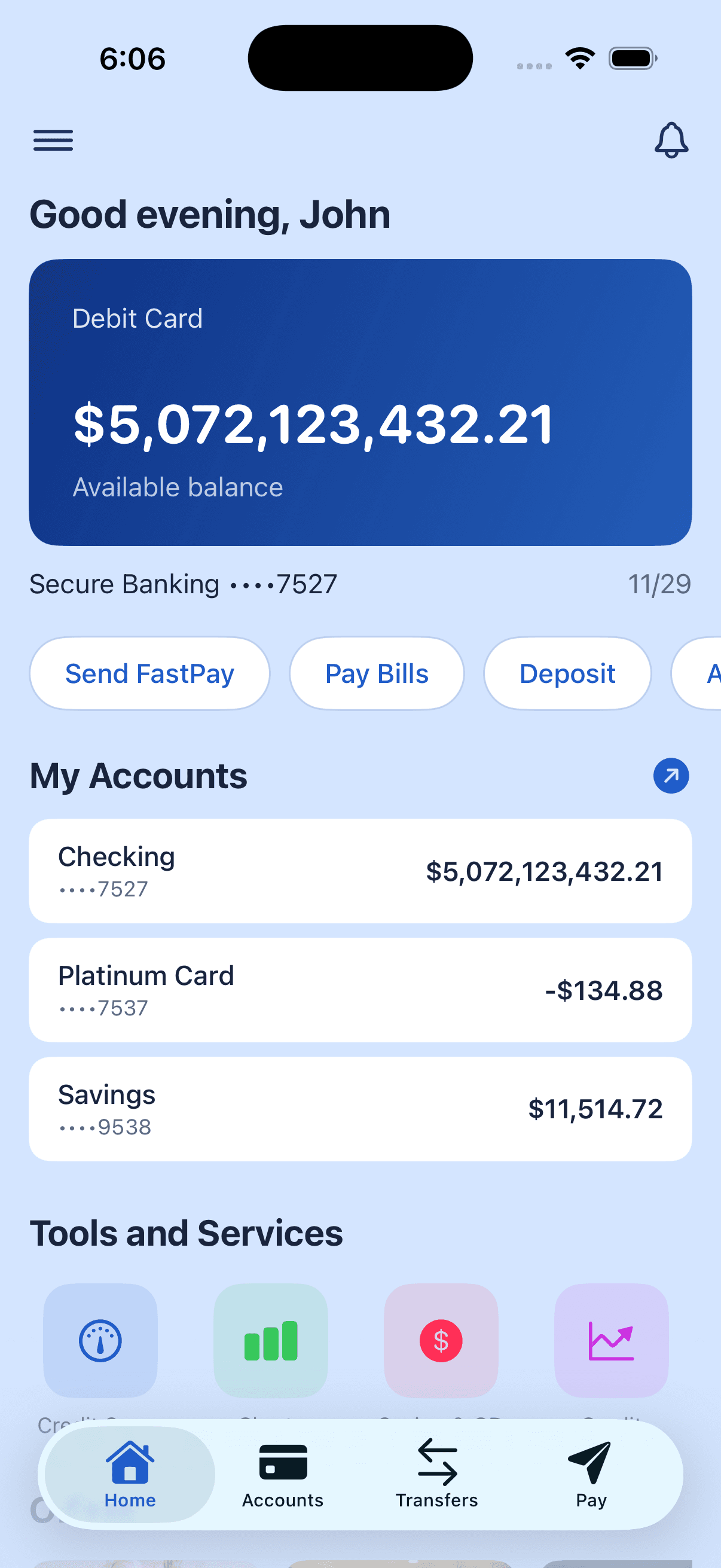
A larp app is only as good as the screen you hand someone. LarpBank's bank account is a full personal-banking simulation - checking, savings, credit, a debit card, and months of transaction history - with every number fictional and every number yours to change.
LarpBank is a larp app for a bank account. Not a number on a screen with a dollar sign in front of it - an entire personal-banking interface, built in SwiftUI to the standard of a real fintech product, where every account and every transaction is fictional and under your control.
This piece is scoped to the bank side. Crypto mode and LarpStocks live in the same app and share the same data, but the bank account is where most people start, so it's worth explaining on its own.
What the bank account actually does
Real account types, with real rules
Checking, savings, and credit, each behaving the way it should. Checking and savings stay positive; a credit account can carry a negative balance. The debit card sits at the top of the screen with a masked account number, the way you'd expect it to.
90 days of history, seeded on first launch
Open the app for the first time and you're looking at 60-120 transactions per checking and credit account across the last three months, plus a lighter trickle on savings - sorted across 12 categories with merchant names and icons. You never start with an empty account.
Transfers and bill pay that work
Move money between your own accounts, or pay anyone using the bank fields your region actually uses. The flows complete, the balances update, and the transaction lands in the history - because a scene where someone taps "send" and nothing happens is a scene that breaks.
Triple-tap any balance to edit it
Triple-tap a balance - the debit card, an account row, anything - and type a new number. There's no admin panel and no spreadsheet running alongside. The editing surface is the interface, so the account always says what the story needs it to say.
The details that sell it
Pending transactions, quick actions, merchant offers and cashback cards. None of it is load-bearing on its own; together it's the difference between a screen that looks like a bank and a screen someone can hold in their hand and scroll.
Offline, always
Zero network calls. No sign-up, no email, no password, no cloud sync, no analytics. The app asks for a first name and nothing else, and every byte of your fictional account lives on your device. It works identically in a basement with no signal.
Free vs. Pro
What you get without paying
Free users get the full bank account - all account types, seeded history, transfers, bill pay, and the triple-tap gesture - with balances and transactions capped at $10,000. LarpBank Pro removes the cap, as either an annual subscription or a one-time lifetime unlock.
If you want the reasoning behind these choices rather than the list of them, read inside the design of the best fake banking app. If you're teaching with it, there's a guide for simulating a bank account for financial literacy.
All data is fictional and stored locally.
Try the bank account
LarpBank is free to download on iOS, with an optional one-time Pro upgrade. No account, no real money.